


How To Change the Battery in Your Nissan Key Fob
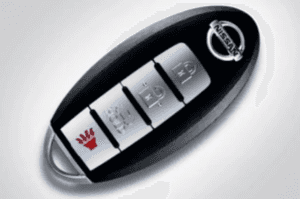
Your Nissan’s key fob battery is one of those things that you’ll probably never think about until it can no longer power your key fob. Whether that moment has already come or you’re simply someone who likes to be prepared, knowing how to change your Nissan key fob battery can be an important piece of information. Keep reading to learn how to spot the signs that your fob is about to fail and how to replace it when it does.
Symptoms of a Dying Nissan Key Fob Battery
Knowing some common symptoms of a Nissan key fob battery that’s about to fail can help you be proactive and change it in time. While opening the door and starting the car without the key fob is technically possible, it usually involves opening the fob and taking out the emergency metal key inside. Depending on where you are and what you’re doing, you may not be able or have time to do so. This is why spotting the early signs can be helpful. Some of them are:
- Its range keeps shrinking: If you start to notice that your Nissan’s key fob doesn’t have the range it used to, the most likely reason is that the battery is about to run out.
- You need to push the button multiple times: Another common symptom is needing to press the lock or unlock button repeatedly for the fob to work. If it happens once, you may assume you pressed it incorrectly, but if it happens repeatedly, then it’s likely because of the key fob battery.
- You get a “Key Battery Low” message on your dashboard: Many Nissan models, particularly those with keyless entry systems, have special sensors that are able to detect when the key fob battery is about to die. You can consult your owner’s manual to find out if yours has this feature.
- It’s inconsistent: The previously mentioned symptoms may come and go for a while, as the battery still has enough juice to work well from time to time. It’s still a good idea to replace the battery as early as possible, though, so you can avoid unwanted situations.
Step-By-Step Guide to Changing Your Nissan Key Fob Battery
When you decide it’s time to change your Nissan’s key fob battery, follow these steps:
- Buy a new battery: Before getting to work on replacing your Nissan’s key fob battery, you’ll need to find a replacement. You’ll find the exact battery type in your owner’s manual, but most popular Nissan models use a CR2032 battery, except the Armada, which uses a CR2025 battery.
- Remove the physical key: The next step is removing the hidden metal key inside your Nissan’s key fob, as this will expose a slot that you can use to open the fob. Most Nissans from the past 15 years have this key, and there are multiple types of physical keys depending on your exact model. You can usually remove it by pressing a button or sliding a switch.
- Open the key fob: Now that you have access, use a small flathead screwdriver to pry the fob open. Try to be gentle, as plastic components can easily break.
- Replace the battery: You should now see your Nissan key fob’s battery. Remove it, remember its orientation, and place the new one in the same spot and oriented the same way.
- Put the key fob back together: You now need to perform some of the steps in reverse. Put the key fob back together and place the physical key in its original location.
- Try out the new battery: Your Nissan’s key fob should now be working as well as it did when it was brand new. Test it by locking and unlocking your car a few times, and remember to also confirm the range, which should be somewhere between 30 and 50 feet.
What if Changing the Battery Doesn’t Solve the Problem?
If, after following the steps above, your Nissan’s key fob still isn’t working, the problem may be elsewhere. Consider performing these actions to identify the root of the issue:
- Check your battery’s orientation: One of the most common mistakes when putting a new battery into a device is orienting it incorrectly. Make sure it faces the right way.
- Reset your key fob: Your key fob may sometimes need a reset. This usually involves performing a specific sequence of actions, which you’ll find in your owner’s manual.
- Inspect the fob for damage: You may have hit your key fob on something or dropped it on a hard surface. This can cause it to malfunction, so look at it closely to see if there’s any sign of physical damage.
Tips To Extend the Life of Your Nissan Key Fob Battery
Like any other battery, the one in your Nissan’s key fob will eventually quit on you. However, you can maximize its life span by following some simple practices. They include:
- Don’t use it if you don’t have to: While you should obviously use your key fob for everyday tasks such as locking, unlocking, and starting your Nissan, avoiding overuse can extend the battery’s life span. For instance, some Nissan key fobs have additional features, and minimizing their use can extend battery life.
- Avoid exposing it to extreme temperatures: Batteries are at optimal capacity in moderate temperatures. Exposing your Nissan key fob to extreme heat or cold may affect its battery’s life span.
- Keep it away from other electronic devices: Placing your key fob near other electronic devices may lead to interference, which can cause premature draining.
Call Jim Bass Nissan for Any Issue With Your Nissan
From a simple key fob replacement job to more complex repair operations, you can rest assured that our service center at Jim Bass Nissan in San Angelo will have you covered. Our expert certified technicians are trained to work on your exact make and model, so they’ll know it inside and out. We only use genuine parts and have advanced diagnostic equipment to assist us. Contact us today to schedule your service visit.

0 comment(s) so far on How To Change the Battery in Your Nissan Key Fob